Migrating an RKE2 Provisioned Cluster to a different Rancher as an Imported Cluster
A guide for migrating an RKE2 cluster to different Rancher instance
A guide for migrating an RKE2 cluster to different Rancher instance
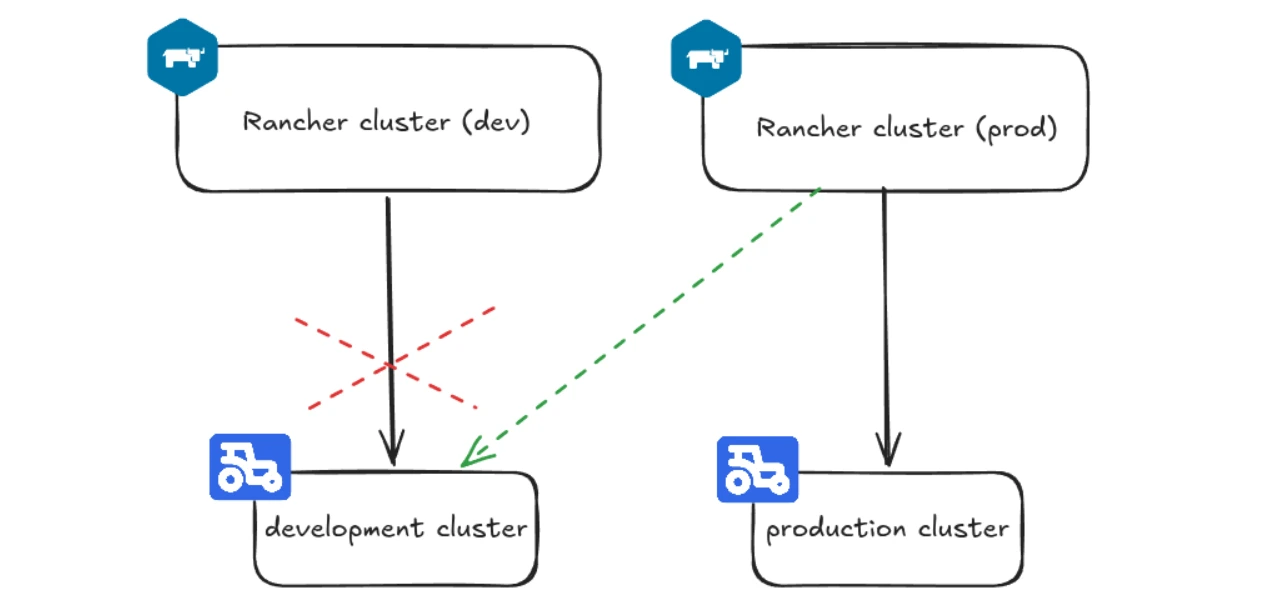
In this blogpost I'll describe how I migrated a Rancher provisioned cluster to a different Rancher instance as an imported cluster.
Rancher makes managing kubernetes clusters easy, whether it is by provisioning a brand new cluster or importing an existing one. Provisioned clusters, while benefitting from the full cluster lifecycle control by Rancher, are quite dependent on the parent Rancher instance.
If something were to happen to the Rancher cluster, the downstream clusters' Kube API will become unavailable if it's gated through Rancher (my kubeconfig used server address old-rancher-instance.com to connect to the API) rendering you unable to manage the provisioned cluster until the Rancher cluster comes back up.
In my case, the Rancher cluster was a Docker container running in a Hetzner VM - a setup suitable for testing, but not for managing the increasingly important dev cluster. Losing access to the development cluster isn't as bad as losing access to the production cluster, nevertheless, when the Rancher Docker container crashed due to insufficient storage, it made quite a few developers very unhappy for a couple of hours.
My production cluster is managed by a much more resilient Rancher cluster running on three VMs with enough hardware resources to handle both downstream clusters if need be. Moreover, the production cluster was not provisioned by Rancher, only imported to Rancher for management. If the Rancher cluster went down, production wouldn't be affected so heavily and could be imported into a different cluster easily if needed.
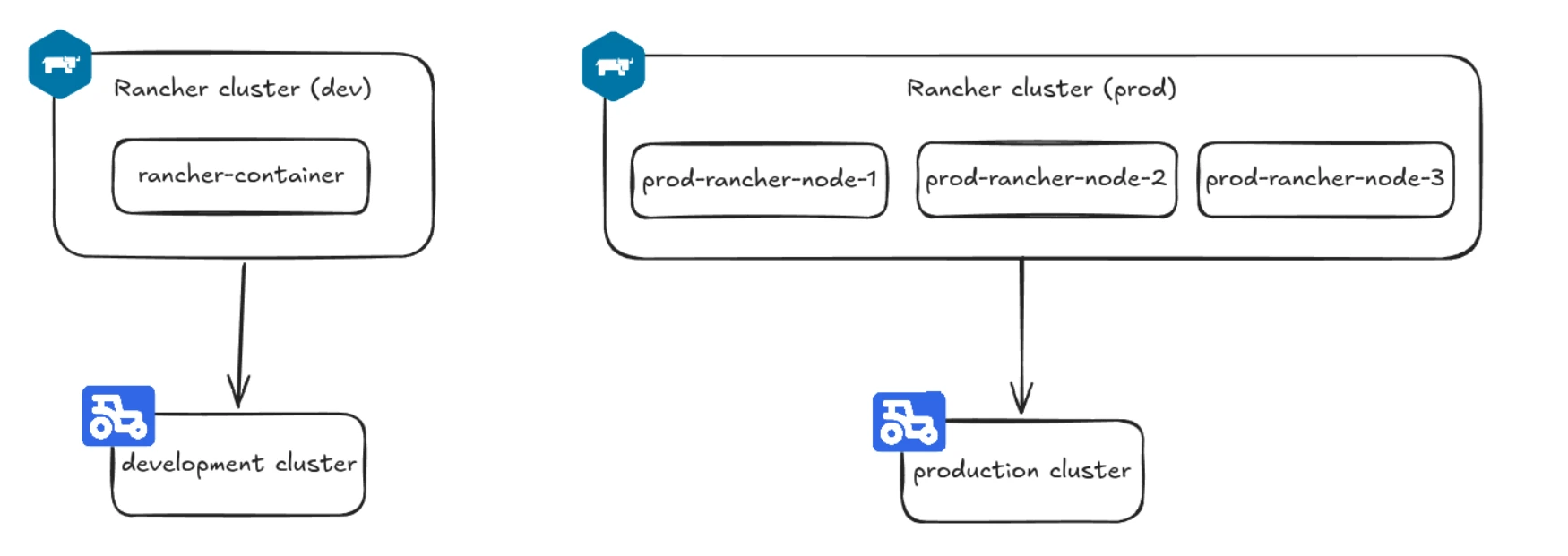 Topology before migration
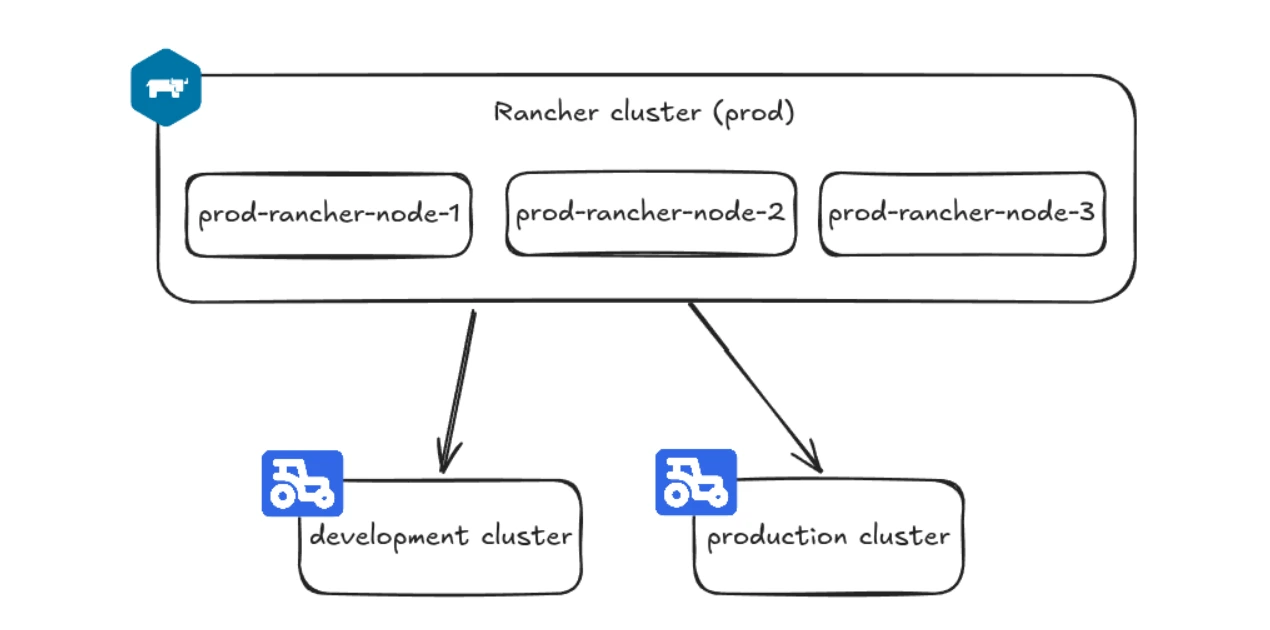 Topology after migration
The production Rancher was created after the development Rancher, but I wished the development cluster were managed by this instance from the start. I looked for a way to migrate, but I couldn't find anything substantial, which prompted me to do a proof of concept for myself. After all, Rancher provisioned clusters are still just Kubernetes clusters underneath, so in theory it should be possible to remove Rancher agents and other components from a Rancher provisioned cluster to get a standalone kubernetes cluster that could be imported into another Rancher instance.
Topology after migration
The production Rancher was created after the development Rancher, but I wished the development cluster were managed by this instance from the start. I looked for a way to migrate, but I couldn't find anything substantial, which prompted me to do a proof of concept for myself. After all, Rancher provisioned clusters are still just Kubernetes clusters underneath, so in theory it should be possible to remove Rancher agents and other components from a Rancher provisioned cluster to get a standalone kubernetes cluster that could be imported into another Rancher instance.
I took an etcd snapshot in case anything goes wrong. Until you delete the downstream cluster from Rancher, you can go back to the original state by restoring the snapshot, the Rancher agent will be restored and it will re-establish the connection to the old Rancher instance.
I also copied the kubeconfig from the control-plane node (/etc/rancher/rke2/rke2.yaml). This config doesn't depend on Rancher and works just like any Kubernetes cluster kubeconfig, but I had to make two modifications:
server: https://<development-control-plane-node-public-IP>:6443
# I added tls-san as a standalone file: /etc/rancher/rke2/config.yaml.d/99-tls-san.yaml:
tls-san:
 - <development-control-plane-node-public-IP>


# Then I deleted the serving certificate and its key and restarted the rke2-server service to re-issue them:
rm /var/lib/rancher/rke2/server/tls/serving-kube-apiserver.crt
rm /var/lib/rancher/rke2/server/tls/serving-kube-apiserver.key
systemctl restart rke2-server.service
I also recommend taking a backup of the cluster's RBAC resources, mainly cluster roles and cluster role bindings since some of these may be deleted during the cleanup as I'll explain later.
First I need to clarify that I did not delete the cluster from the management Rancher. Deleting means complete deprovisioning including wiping the nodes, not just deleting the cluster from Rancher. That is the opposite of what I wanted to do, I needed to orphan the cluster. Rancher agent that communicates with the management cluster runs as a systemd service on the downstream cluster nodes, that service had to be stopped/disabled first:
# stop the Rancher agent and disable it running on reboot
systemctl disable --now rancher-system-agent
The cluster showed up as unavailable in the Rancher UI after this step. It should have been safe to delete at this point, but leaving it like that was also harmless and left me with a way to get back to the original state by restoring the etcd backup. At this point the original kubeconfig I downloaded from Rancher UI stopped working and I had to switch to using the kubeconfig I copied from the control-plane node.
Rancher agent isn't the only Rancher component running in downstream clusters. Rancher provides rancher-cleanup - a handy tool to remove all Rancher components, just clone the repo and deploy the cleanup job:
kubectl create -f deploy/rancher-cleanup.yaml
Later, after importing the cluster, I discovered that rancher-cleanup failed to clean up the system-upgrade-controller cluster role binding. I saw this error in the helm-operation pods:
Error: Unable to continue with install: ClusterRoleBinding "system-upgrade-controller" in namespace "" exists and cannot be imported into the current release: invalid ownership metadata; annotation validation error: key "meta.helm.sh/release-name" must equal "system-upgrade-controller": current value is "mcc-<cluster_name>-managed-system-upgrade-controller"
What gave it away as a leftover resource was its meta.helm.sh/release-name annotation: mcc-<cluster_name>-managed-system-upgrade-controller, in imported clusters it is just system-upgrade-controller.
After purging Rancher from the cluster I therefore recommend checking all the helm releases and checking RBAC resources for their annotations.
On the other hand, the rancher-cleanup tool has overreached and deleted cluster role bindings that are necessary for normal cluster operation. For example, the following three cluster role bindings are needed for cluster operations, but only the helm one survived the cleanup:
helm-kube-system-rke2-coredns                                   ClusterRole/cluster-admin                                                   133m
rke2-coredns-rke2-coredns                                       ClusterRole/rke2-coredns-rke2-coredns                                       19s
rke2-coredns-rke2-coredns-autoscaler                            ClusterRole/rke2-coredns-rke2-coredns-autoscaler                            19s
I needed to get the two rke2 cluster role bindings back, RKE2 uses Helm charts to deploy some of its resources. I repopulated RBAC by syncing the helm charts installed in the cluster:
for c in $(kubectl -n kube-system get helmchart -o name); do
   kubectl -n kube-system patch "$c" --type=merge -p '{"spec":{"set":{"forceResync":"1"}}}'
 done
Rancher keeps auto-deployed resources on the control-plane nodes, Rancher cluster agent in particular. These resources are applied on rke2-server restart, recreating the cluster agent, which will try to reconnect to the old Rancher instance. Delete the files in /var/lib/rancher/rke2/server/manifests/rancher/, make sure to leave /var/lib/rancher/rke2/server/manifests/ intact, it contains non-Rancher resources necessary for cluster operation.
The Rancher auto-deployed resources will be recreated with new credentials/addresses after the cluster is imported to the new Rancher instance.
After purging the old Rancher from the cluster, it was time to import it to the new Rancher instance, here are steps in the Rancher UI:
Import Existing in the dashboardGenericCluster Name and click Createkubectl apply -f https://new-rancher-cluster.com/v3/import/dfmbi...<more-hashed-letters>...gdsfd.yaml
My Rancher is behind Cloudflare and I got blocked from the terminal. I proceeded by opening the link from the join command in my browser, copied the YAML file over to my laptop and applied it from there.
After applying the join command, I checked the cattle-cluster-agent logs:
kubectl -n cattle-system logs deploy/cattle-cluster-agent
The cattle-cluster-agent was also getting blocked by Cloudflare when trying to join the cluster:
ERROR: https://new-rancher-cluster.com/ping is not accessible (The requested URL returned error: 403)
Instead of whitelisting the cluster nodes in Cloudflare, I configured a host alias for one of the Rancher cluster's control plane nodes in the cattle-cluster-agent deployment. This allowed the cattle-cluster-agent pods to bypass Cloudflare and resolve the domain directly:
<cattle-cluster-agent deployment>
spec:
...
 template:
 ...
   spec:
     ...
     hostAliases:
     - hostnames:
       - new-rancher-cluster.com
       ip: <ne-rancher-cluster-control-plane-node-1-IP>
After bypassing Cloudflare, the cattle-cluster-agent pod had an issue finding the root CA:
INFO: https://new-rancher-cluster.com/ping is accessible
INFO: new-rancher-cluster.com resolves to <rancher-cluster-control-plane-node-1-IP>
time="2026-07-25T10:12:26Z" level=info msg="starting cattle-credential-cleanup goroutine in the background"
time="2026-07-25T10:12:26Z" level=info msg="Listening on /tmp/log.sock"
time="2026-07-25T10:12:26Z" level=info msg="Rancher agent version v2.13.3 is starting"
time="2026-07-25T10:12:26Z" level=error msg="unable to read CA file from /etc/kubernetes/ssl/certs/serverca: open /etc/kubernetes/ssl/certs/serverca: no such file or directory"
time="2026-07-25T10:12:26Z" level=error msg="Strict CA verification is enabled but encountered error finding root CA"
As the last log line said, Rancher had strict CA verification enabled. I switched to the Rancher cluster and configured agent-tls-mode to system-store:
kubectl edit settings.management.cattle.io agent-tls-mode

apiVersion: management.cattle.io/v3
customized: false
default: strict
kind: Setting
metadata:
 name: agent-tls-mode
source: ""
value: system-store
This worked because my cluster uses a publicly-trusted (Let's Encrypt) certificate. System-store tells the agent to validate Rancher's cert against the OS trust store.
If your Rancher uses a self-signed certificate, system-store can't validate it. Leave agent-tls-mode on strict and make sure the agent gets Rancher's CA, either via the --ca-checksum in the registration command or by populating the cacerts setting so the agent can fetch and verify it.
After this final configuration, the development cluster successfully connected to Rancher and behaved like a normal imported cluster.